Auto recharge credits
Last updated: March 20, 2026
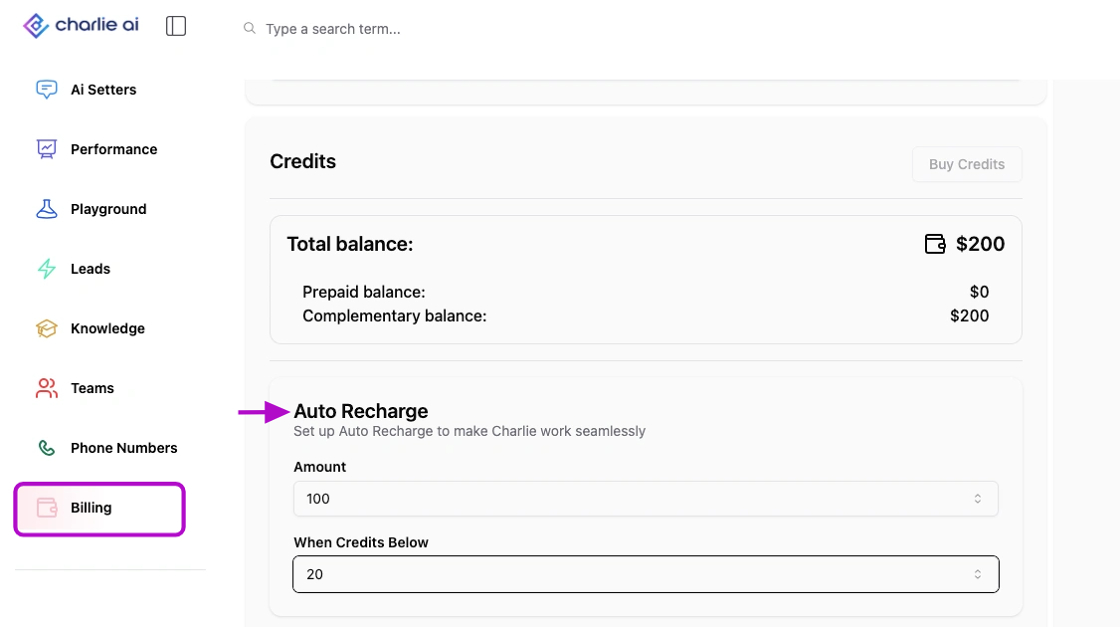
Charlie's generated messages work with credits. To see your account's balance, you can go to the "Billing" tab on your left side menu, and scroll down until you get to the " credits" section, here you can program an "Auto Recharge" to
Prerequisites
Have a credit card registered
Relevance
This feature guarantees no downtime in your operation, ensuring Charlie can continue engaging leads without the risk of service interruption. Your account recharge will be automatically triggered the moment your credit balance drops below a pre-set threshold.
Step by step configuration
Go to your Billing tab
Scroll down until you see Auto recharge
Define the amount of credits that you want to automatically recharge
Set the threshold that will trigger the automation
It'll auto-save the configuration!
The credits will be charged to the "Prepaid balance"