Voice Redial
Last updated: February 11, 2026
Instead of letting unanswered calls or brief connections become dead ends, Charlie can automatically execute a redial. The "Voice redial" is an intelligent automation setting that ensures Charlie automatically follows up with leads who don't answer or hang up quickly, maximizing engagement opportunities without manual intervention. It's designed to maximize conversion rates and lead's experience.
Prerequisites
Have an Ai setter configured ( 📄 Voice Setter Set up Guide)
Activation
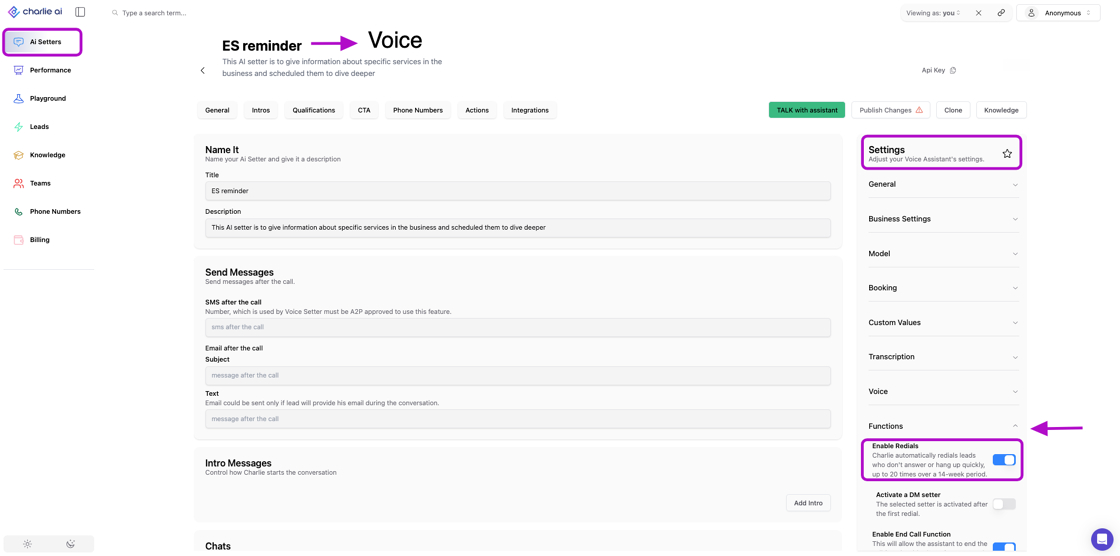
Go to you "Ai setters" tab
Scroll down, till the bottom, and select a voice setter
Look for the "Settings" menu at your right side menu, and click on the "Functions" option
Enable the Redials toggle
Logic criteria
A redial function is activated when any of the following conditions are met:
The call duration was less than 5 seconds.
The recipient did not respond to the introduction.
The recipient did not respond to Question 1 (Q1).
The call was terminated (hung up) within 5 seconds.
The call reached an automated voicemail or message service.
Specificities
When a Redial is triggered, then Charlie redials the Lead on the following cadence → exact timing of redial to be engineering-determined
First redial: add to the queue 30 minutes after first call ends
Second thru seventh redials: Add to queue once per day (same time as first call)
Eighth through 20th redials: Add to queue once per week (same time/day as first call)
Redials are logged as a new call in the Leads list for Voice conversations → includes the status quo observability logs to the user.
Disabling redials will:
Stop scheduling new redial attempts
Cancel pending redials that haven't been executed yet
Not affect call logs or data from previous redial attempts (this is different than the 📄 Hunts: Voice redial)
Restrictions
A DQ'd lead will never trigger a Redial unless the DQ is removed
Voice Redials are not global, they should be configured individually for each Voice Setter.
Key insights
The simplicity of enablement (single toggle) belies the sophisticated system working behind the scenes, making powerful automation accessible without complexity.
Redial logs provide rich data about lead behavior, optimal contact times, and message effectiveness that can inform broader strategy improvements.
After enabling, redials work automatically, but ongoing monitoring ensures the strategy remains effective and aligned with business goals.