Skills
Last updated: August 28, 2026
Conversational Skills are one of the key pillars of Charlie’s knowledge system. While Objections tell Charlie how to handle specific concerns, Skills give Charlie reusable instruction packs that shape how it responds in particular situations, from handling pricing questions to re-engaging cold leads.
How it works
Skills sit alongside Objections in the third tier. They enhance and shape Charlie’s responses but will never contradict your Training Data or foundational Information. Think of Skills as strategic playbooks that Charlie pulls from when the situation calls for it.
They are activated automatically by Charlie’s AI. There are no manual triggers, keywords, or rules to configure. You define when a skill should apply (via its description), and Charlie decides in real time which skills are relevant to each conversation using an intelligent matching system that reads the conversation in real time and decides which skills apply.
Here’s how it works behind the scenes:
1. When a lead sends a message, Charlie reviews all your enabled skills.
2. An AI model reads each skill’s name and description alongside the lead’s message and recent conversation context.
3. It selects only the skills that are relevant to the current situation — and records a reason for each match.
4. Only the matched skills’ instructions and context are used to guide Charlie’s response.
Think of them as: Complementary guidance that enhances responses without overriding core knowledge.
Components of the Skills
Name
short label for the skill to easily search and identification it in the knowledge base (e.g., “Pricing Objection Handler” or “Re-engagement Playbook”
Description
Tells Charlie’s AI when to use this skill. This is the most important field, it’s what the AI reads to decide whether the skill is relevant to the current conversation. Write it as a clear situational trigger (e.g., “When pricing, cost, or budget comes up — explain tiers, mention free trial, frame ROI”).
Instruction
The actual guidance Charlie follows when the skill is activated. These are the step-by-step directions for how to respond (e.g., "always mention the 14-day free trial”).
Context (optional)
Supporting facts, data, or reference material that Charlie can draw from (e.g., pricing tiers, competitor comparisons, testimonials).
Configuration & Management
Creating a Skill
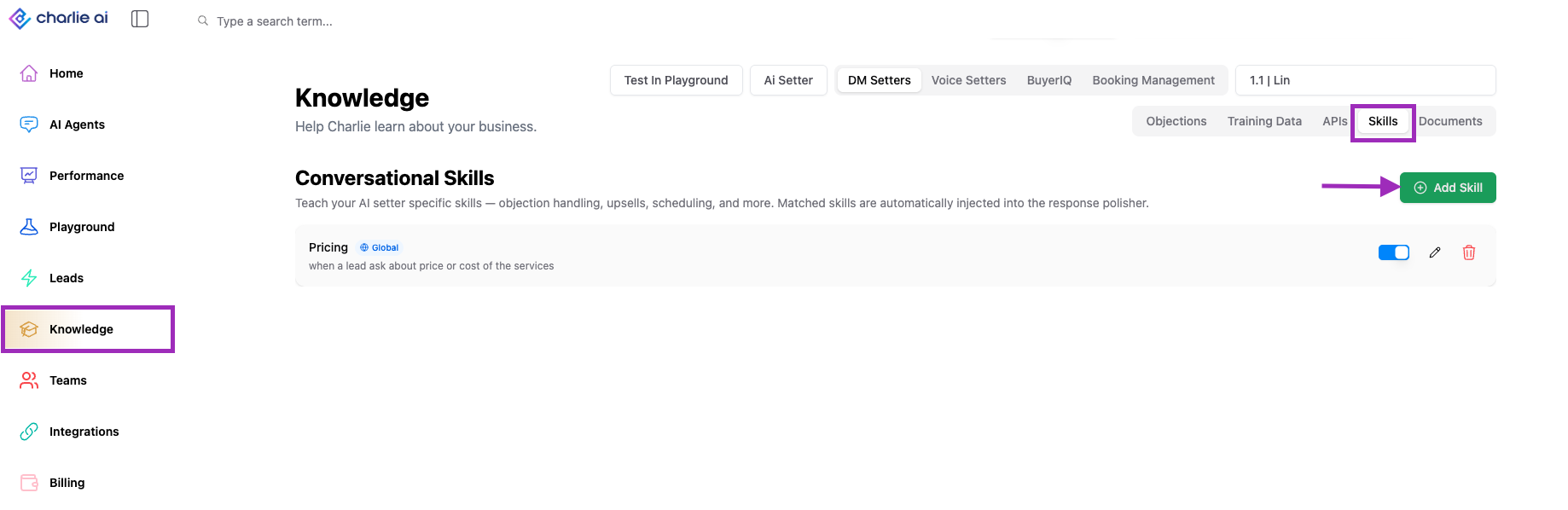
1. Navigate to "Knowledge" in the dashboard.
2. Look for the Skills option in the left top side section.
3. Select an AI setter to create the skill
4 Click “Create Skill” and fill in the fields
5. Click Save.
The skill is enabled by default and will immediately be available for Charlie to use.
Management
Go to the Knowledge base, and select the Skills tab, here you can:
• Enable / Disable: Toggle any skill on or off. Disabled skills remain in your list but are not considered by the AI when generating responses.
• Reorder Priority: Drag skills to reorder them. When multiple skills match a conversation, higher-priority skills take precedence in shaping Charlie’s response.
• Edit: Update a skill’s name, description, instructions, or context at any time. Changes take effect immediately.
• Delete: Remove a skill permanently.
• Global Skills: Mark a skill as Global to have it apply across all your AI setters, not just the one you’re configuring. This is useful for brand-wide guidelines like tone of voice or compliance language.
The skills list also shows a stats bar with the total, enabled, and disabled skill counts for quick reference.
Key Insights
The description drives everything, Charlie’s AI reads your skill descriptions to decide what’s relevant. A well-written description is the difference between a skill that activates perfectly and one that never fires or fires too often.
Skills allow you to scale, You can have dozens of skills enabled at once. Because the AI only applies the ones relevant to each message, adding more skills won’t slow down or confuse Charlie’s responses.
Combine skills with objections, they work best together. Use Objections for specific reactive scenarios and Skills for broader strategic guidance. Charlie considers both when generating responses. Objections = reactive and Skills = Strategical