Delayed Booking intent notification
Last updated: July 28, 2026
Get notified instantly in Slack when a lead wants to book but can’t commit right now. The Delayed Intent Notification alerts your team the moment a lead expresses interest in booking but delays, so you can follow up at the right time and close the deal.
Prerequisites:
your Slack workspace must be connected to Charlie AI:
Navigate to Integrations in your Charlie AI dashboard.
Select the Slack tab.
Follow the steps to connect your Slack workspace.
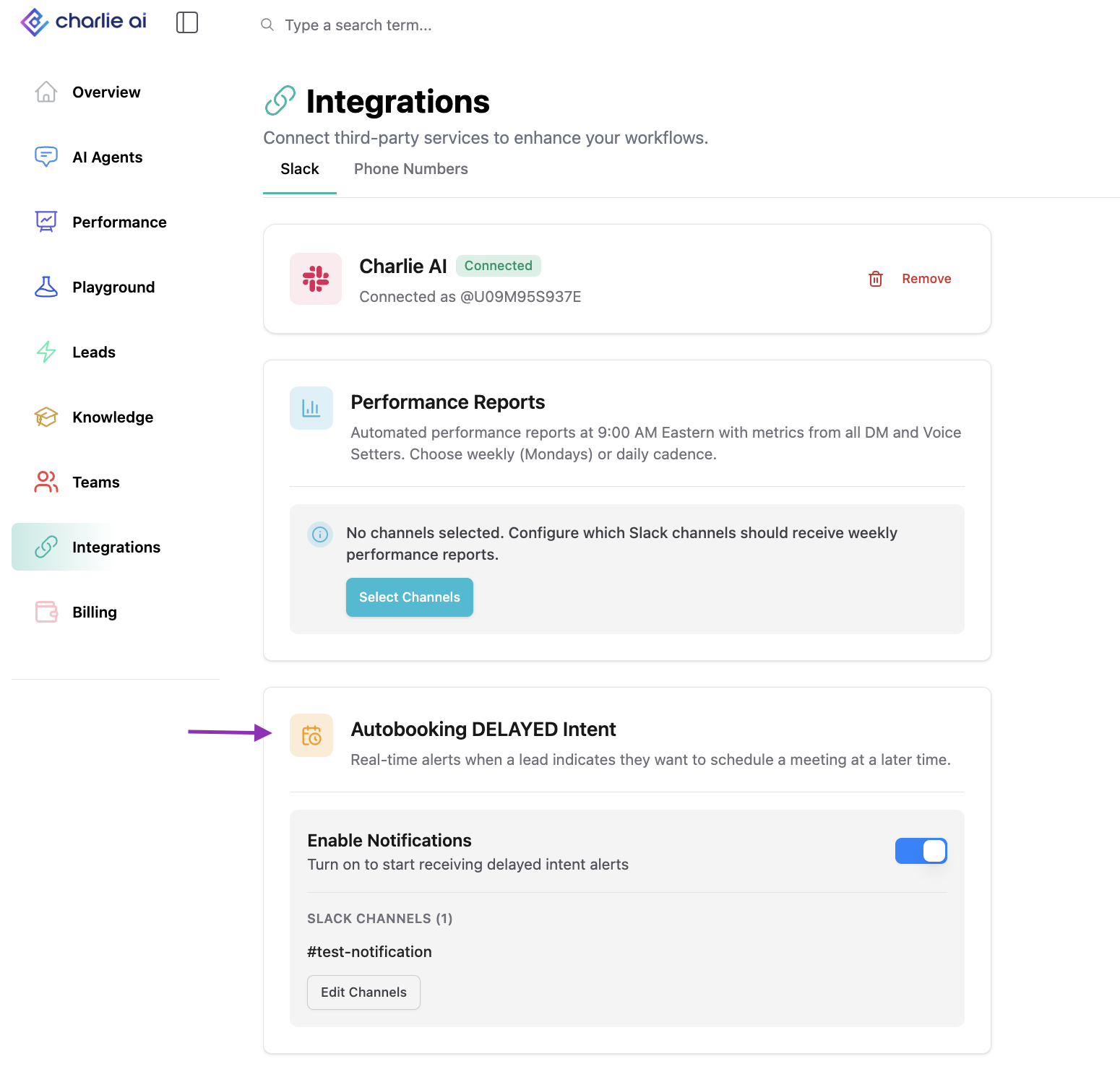
Once Slack is connected, you’ll see a section for Autobooking DELAYED Intent under the Slack tab where you can configure which channels receive these notifications.
How it works
When your AI setter is working a lead toward a booking, sometimes the lead expresses interest but outside the open scheduling window "In a month from now", "by the end of the year", "In 3 weeks"
Charlie AI classifies this as a DELAYED intent — the lead has shown buying interest and wants to book, but cannot be schedule at the time. These are high-value leads that are close to booking and deserve immediate human attention.
When a Delayed intent is triggered, Charlie AI automatically sends a Lead Booking Request notification to your configured Slack channels so your team can step in and close.
Configuration
Step 1: Navigate to Integrations
Go to Integrations in your Charlie AI dashboard and select the Slack tab.
Step 2: Locate the Autobooking DELAYED Intent Section
Once Slack is connected, you’ll see the “Autobooking DELAYED Intent” section alongside other Slack notification options (such as Weekly Performance Reports).
Step 3: Select Slack Channels
Click “Select Channels” to choose which Slack channels should receive Delayed Intent notifications.
• You can select one or multiple channels — all selected channels will receive the notification.
• Click “Save” to confirm your selection.
• You can edit your channel selection at any time.
Step 4: Enable Notifications
Toggle the notifications switch to ON to activate delivery. When toggled OFF, notifications will not be sent, but your channel selections are preserved.
You can update your channel selection at any time
Notifications
Notifications are sent in real time, the moment Charlie AI detects a Delayed intent during a conversation. There is no batching or delay — your team is alerted immediately so they can act while the lead is still warm.
Common scenarios that trigger a Delayed intent notification:
• A lead responds to a booking CTA with "by the end of the year"or "In 3 weeks"”
• A lead expresses interest in the service but asks to follow up later
• A lead says they’re interested but can’t commit to a specific time yet
When a Delayed intent is triggered, a Slack message is posted to all your configured channels with the title “Lead Booking Request.” Each notification includes:
• Lead Name — The name of the lead who expressed booking interest.
• Setter Name — Which AI setter was working the conversation.
• Lead Contact Details — The lead’s contact information so your team can reach out directly.
• Link to Lead Conversation — A clickable link that opens the lead’s full conversation in your Charlie AI dashboard, so you can review the context before following up.
This gives your team everything they need to pick up where the AI setter left off and move the lead toward a booking.
FAQ
Can I send Delayed Intent notifications to multiple channels?
Yes. You can select as many channels as you like — all selected channels will receive the same notification.
Are notifications sent immediately or batched?
Immediately. The notification is sent in real time the moment the Delayed intent is detected.
What’s the difference between a Delayed intent and a regular lead?
A Delayed intent means the lead has actively expressed interest in booking but outside the configured window of time. These are warmer than general leads and benefit from a direct human follow-up.
Will I get a notification for every Delayed intent across all my setters?
Yes. Any setter that detects a Delayed intent will trigger a notification to your configured channels.