Sub account management
Last updated: September 17, 2026
If you manage several Charlie accounts or own multiple business units, you no longer have to log out and log back in to switch between them. One account is designated the main account; the others are linked to it as sub-accounts, and the main account's Owner or Admin can move between them from a single dashboard session.
What it does
Gives you the possibility to switch between your accounts. One account is designated the main account; the others are linked to it as sub-accounts, and the main account's Owner or Admin can move between them from a single dashboard session, have visibility and adjust use cases.
Setting it up
Linking a sub-account to a main account is done by the Charlie team, not self-serve in the account settings — reach out to your point of contact to have accounts linked
Switching accounts
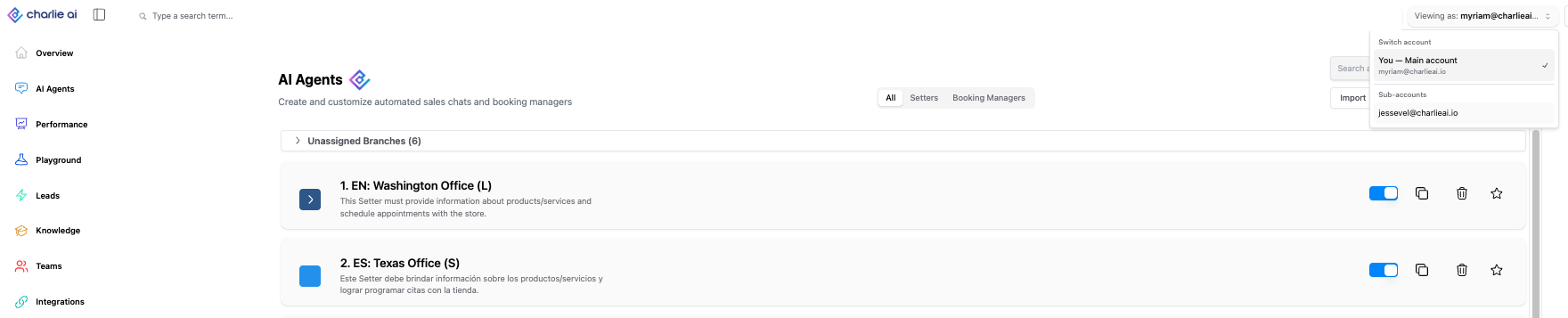
Once linked, Owners and Admins of the main account see a "Viewing as: [account name]" control in the navigation bar. Opening it lists the main account and every sub-account linked to it — pick one to switch into that account's dashboard. A reset (✕) control next to it always returns you to the main account.
The label always shows which account you're currently viewing, so it's never ambiguous which data you're looking at.
- Only the main account's Owner/Admin can switch. Sub-account users themselves do not get a switcher and cannot see other accounts.
- Switching is one level only — a sub-account cannot itself have sub-accounts.
Team visibility across sub-accounts
The Teams page adds an account selector when you have linked sub-accounts. Selecting a sub-account there shows that sub-account's team members and settings, scoped correctly — you're never shown a blended view of multiple accounts' teams at once.
Billing
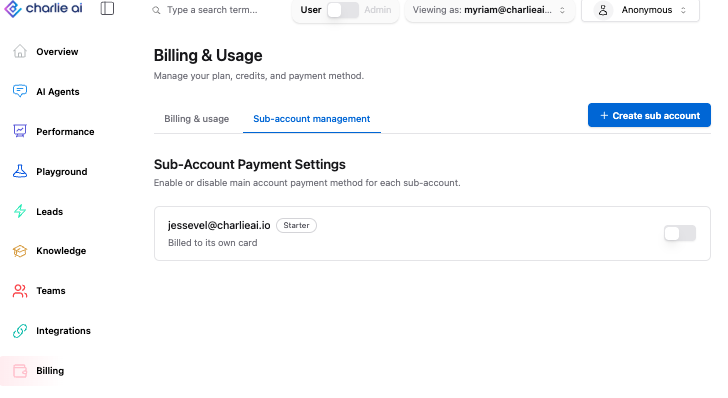
Sub-accounts can be put on centralized billing: the main account's subscription covers linked sub-accounts instead of each one billing separately. Or you can define if they have a independent paymenth method.