Playground: Testing and Role-Playing with Charlie
Last updated: March 5, 2026
The Playground is Charlie's safe testing environment where you can role-play conversations, validate configuration changes, and refine Charlie's performance before deploying or to improve. This essential feature enables you to test conversation flows, evaluate responses, and iterate on your AI Setter's behavior without risk of actual customer interactions.
This guide explains what the Playground is, the access points it has, how to use it effectively, and key insights for maximizing its value in your Charlie implementation.
Purpose and Function
Playground is a simulation environment that allows you to interact with Charlie as if you were a lead, testing how Charlie responds to various scenarios, questions, and conversation paths.
Everything that happens in the Playground is isolated from production. No real leads are created, no CRM updates occur, no appointments are booked.
Prerequisites
Completed the setup for your AI Setter:
Objectives are defined
Examples are inputted.
The 📄 Knowledge Base Overviewis already set up.
When to use it?
Initial Setup
Before enrolling your first real leads, it is useful to verify that fundamental functionalities work as expected after configuring the basic conversation structure (intro, qualification, CTA).
Configuration Changes or Optimizations
When there are significant updates such as modifications on the speech and flow, the addition of new 📄 DM Huntsor 📄 Actions and Branches, or refinements to the knowledge base/training data.
It's also helpful when you need to test adjustments to system integrations or general settings. You can validate new messaging strategies and apply fixes for conversational issues that you find.
Regular Quality Assurance
We suggest to have Periodic spot-checks of Charlie's performance, to:
Validate correct function after platform updates or changes
To verify consistency over time
As part of continuous improvement process
Access points
The Playground can be accessed through three primary methods, providing flexibility based on your workflow.
AI Setter Interface
Click "AI Setters" in your left-side menu
Select Specific Setter you want to test
Look for the Playground Option and click on it
Playground interface opens → Testing environment is ready
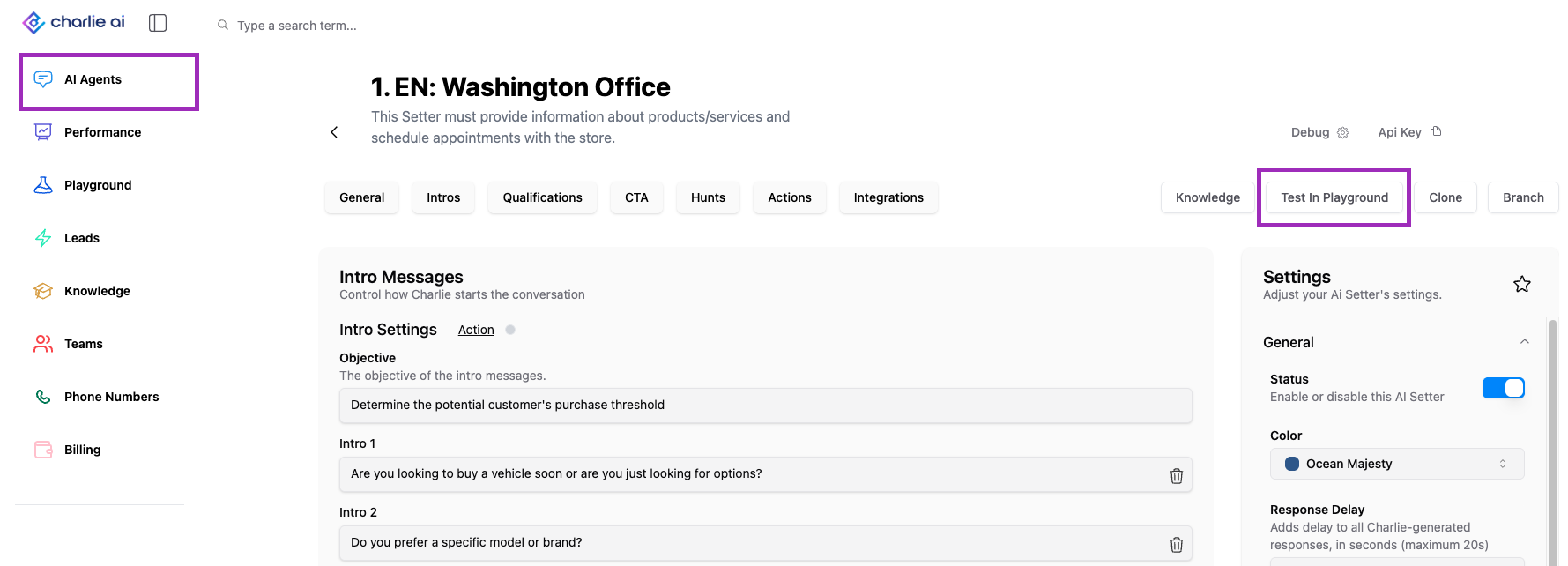
Use this one when you're already working within a specific Setter's configuration, when you're performing setter level configurations/optimizations
Left-Side Menu
Locate navigation menu on left side of Charlie dashboard
Find Playground Section
Select AI Setter to Test
Playground interface opens → Testing environment is ready
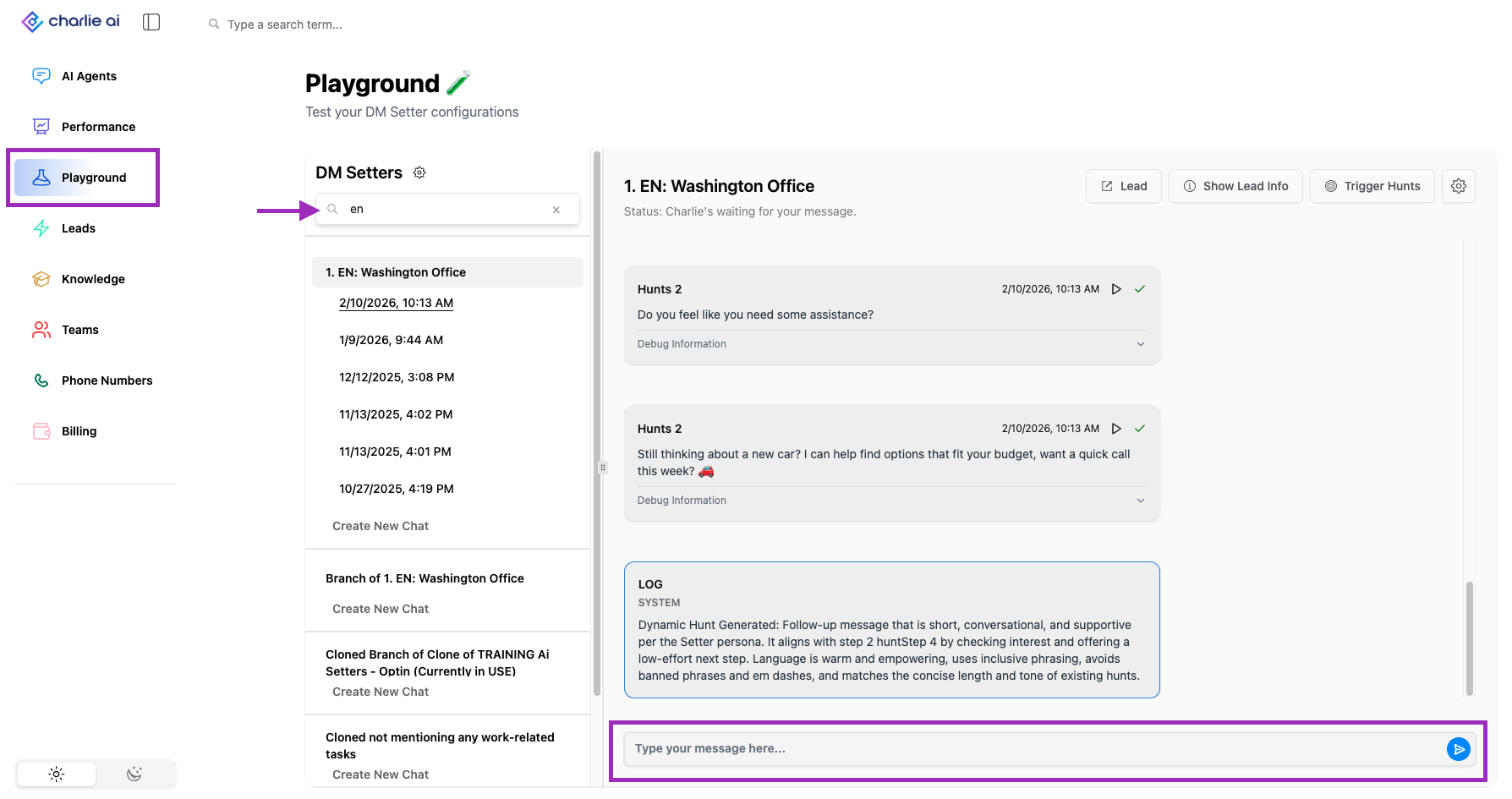
Lead's conversation
Look for the Leads tab in the navigation menu on left side of Charlie dashboard and click o it
Select one of the conversations Charlie has held
Look for the "Play" icon in a reply from the lead
Playground interface opens → Testing environment is ready, and Charlie will load all the previous messages from the lead up to the message where you clicked the Play icon
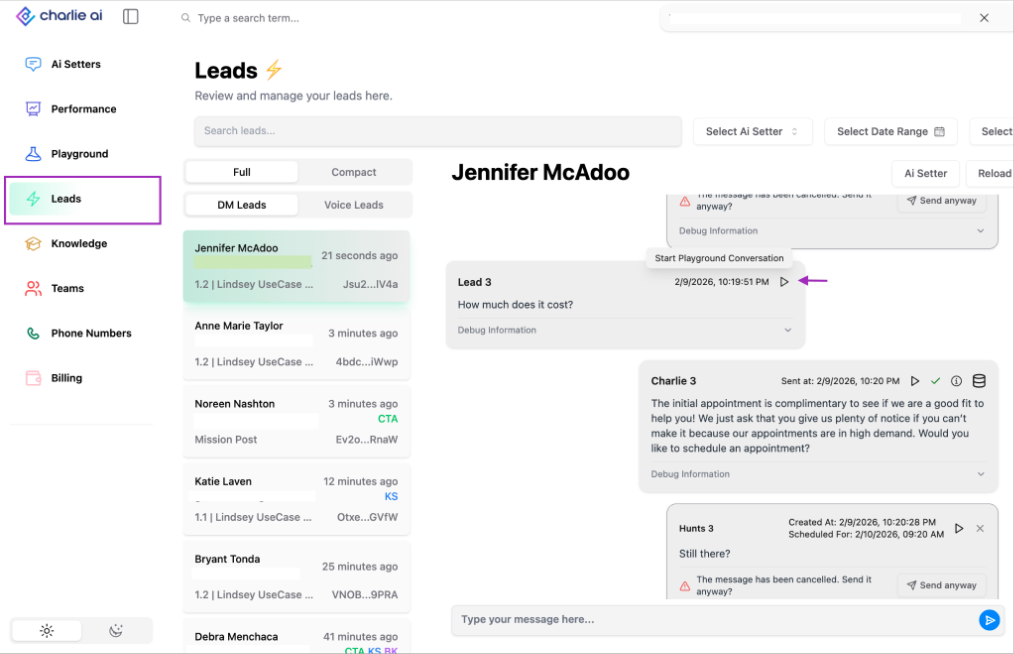
Testing
We highly recommend testing Charlie across diverse scenarios to effectively validate the performance of the established configurations.
Multiple Lead Personas
Ideal Qualified Lead →Verify happy path works perfectly
Budget-Constrained Lead→ verify budget-based qualification/DQ works correctly
Objection-Heavy Lead→Verify Charlie can handle challenges and objections were all mapped correctly
Off-Topic Lead →Validate Kill switch and DQs are working
Specific Features
Testing Knowledge Base:
Ask questions about your business, services, pricing
Test edge-case questions
Verify Charlie provides accurate information
Check tone and style consistency
Testing Actions:
Provide responses that should trigger specific actions
Verify routing works correctly (continue, skip, DQ, branch)
Test all action conditions systematically
Testing Hunts:
Hunts need manual execution in Playground as they are time-based
Validate 📄 Hunts Timing is correct
Review the Dynamic hunts
Testing Talk later:
You can mention unavailability to ensure the functionality is working correctly
It will be automatically scheduled and you will validate Logs are correctly
Key Insights
The Playground's value isn't predicting all scenarios, but validating that core functionality works and critical errors are eliminated.
Use Playground to prevent disasters (broken flows, major errors), use production to discover opportunities (what messaging resonates, what questions matter, what objections arise). These are complementary learning environments, not alternatives.
Iteration is the Key to succeed, and the playground provides the perfect environment to do so as many ties as needed.