Ai Setter Overview
Last updated: February 26, 2026
The "AI Setter" tab is the essential first section of your Charlie AI dashboard and serves as the central hub for all Setter creation, configuration, and management. This guide walks you through its functionalities, key configurations, and strategic insights. You must visit this section to view, adjust, or create all the AI Setters (use cases) needed to implement Charlie effectively in your operations.
Prerequisites
Have an active Charlie ai account
Log in with your credentials to app.charlieai.io
Purpose & functions
The AI Setter dashboard is your primary workspace for building, configuring, and managing all AI Setters within your Charlie account. This is where you design conversation structure, configure automation, and control how Charlie engages with your leads. You can:
View all existing AI Setters in your account
Create new AI Setters for different use cases or campaigns
Configure conversation structure (intro, qualification, CTA)
Set up automated follow-ups (Hunts)
Integrate with external systems (CRMs, calendars, etc.)
Test conversation flows before deployment
Manage Setter settings and preferences
Clone Setters for rapid deployment of similar use cases
Create conversation branches for dynamic conversation paths
Your AI setters are listed in alphanumeric order. You have the flexibility to customize the naming convention to place the most important setters at the top of the list.
Renaming
Locate the Setter name field in Settings panel
Click on the current name to edit
Type the new name
Changes typically save automatically
AI Setter Structure: Core Components
1. Intro Messages: Opening messages that Charlie sends to initiate conversations with leads.
2. Qualification Messages: Questions and prompts that Charlie uses to qualify leads based on your criteria.
3. CTA (Call-to-Action) Messages: Messages designed to drive leads toward your desired conversion action.
4. 📄 DM Hunts: Automated follow-up messages sent when leads don't respond or complete actions.
5. Actions: Automated behaviors or triggers that execute based on conversation events.
6. Integrations: Connections to external platforms and services that Charlie works with.
Key functions
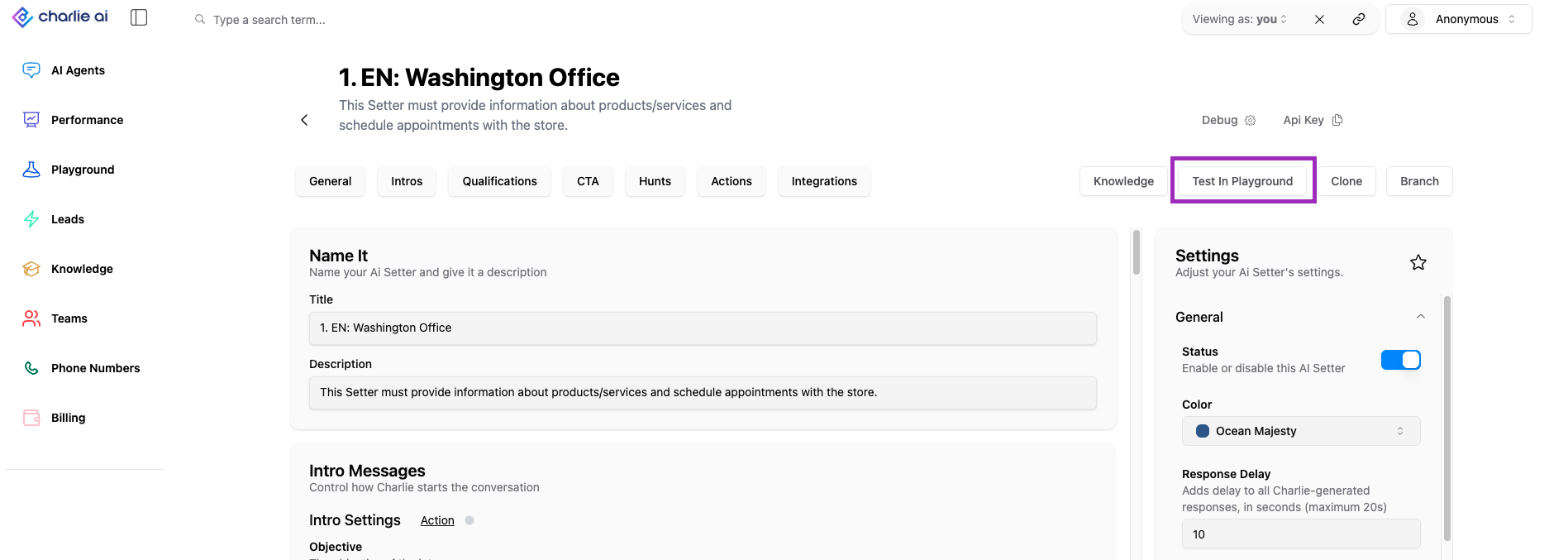
Testing in Playground
What It Is: Safe testing environment where you can simulate conversations with Charlie before deploying to real leads.
Purpose:
Test conversation flows end-to-end
Validate configuration changes before going live
Troubleshoot issues without affecting real leads
Train team members on how Charlie operates
Demo Charlie's capabilities to stakeholders
How to Use:
Locate "Playground" or "Test" button/tab in Setter dashboard
Click to open testing interface
Initiate a simulated conversation as if you were a lead
Interact with Charlie to test various scenarios
Review conversation flow, responses, and outcomes
Make adjustments to configuration as needed
Re-test until satisfied with performance
Cloning AI Setters
What It Is: Feature that allows you to duplicate an existing AI Setter to create a new one based on the original's configuration.
Purpose:
Rapidly deploy similar use cases without rebuilding from scratch
Create variations for A/B testing
Replicate successful Setter configurations for new campaigns
Save time on repetitive setup tasks
When to Use Cloning:
Creating Setters for different products with similar sales processes
Setting up regional variations of the same campaign
Testing configuration changes without affecting live Setter
Scaling proven Setter configurations across multiple use cases
How Cloning Works:
Select the Setter you want to clone
Click "Clone" or "Duplicate" button (typically in Setter menu or action buttons)
System creates an exact copy of the Setter
Clone includes:
All conversation messages (intro, qualification, CTA)
Hunt configurations
Settings and preferences
Integration configurations (may need re-authentication)
Knowledge Base associations
Customize the cloned Setter as needed for its specific use case
Rename to distinguish from original
Deploy when ready
Branching
What It Is: Advanced feature that allows you to create dynamic conversation paths based on lead responses or characteristics.
Purpose:
Personalize conversation flow based on lead attributes
Route different lead types through different qualification processes
Provide customized messaging for different scenarios
Optimize conversion by tailoring approach to lead context
How Branching Works:
Define a branch point in the conversation (e.g., after asking about company size)
Create multiple branches representing different paths
Set conditions for which branch each lead follows
Configure unique content for each branch
Branches can reconverge at later points or lead to different CTAs
API Key
Is an authentication credential that allows external systems to interact with Charlie's API on behalf of your account.
It is used when using custom webhook in your CRM (sends custom values to your setter, activating a dm lead and voice leads to make sure these actions are done to your account, not others)
Format: Long alphanumeric string (e.g., "sk_live_abc123...xyz789")
Purpose:
Authenticates API requests from external systems
Enables custom integrations and automation
Required for programmatic access to Charlie functionality
Allows developers to build custom solutions on top of Charlie
When You Need It:
Building custom integrations with Charlie
Setting up webhooks for real-time event notifications
Developing internal tools that interact with Charlie
Configuring third-party platforms to connect with Charlie
Following documentation for advanced integrations
Restrictions:
It won't work for advanced API developments
Setter ID
It is a unique identifier assigned to each AI Setter in your account.
Format: Typically an alphanumeric string (e.g., "setter_abc123xyz")
Purpose:
Uniquely identifies this Setter in API calls
Used in integrations and webhooks
Required for advanced automation and custom development
Referenced in support tickets for troubleshooting
When You Need It:
To send custom value from CRM to Charlie (GHL) and in HubSpot.
Providing information to Charlie support team
Insights
The AI Setter dashboard is your control point. Every Charlie configuration, integration, and optimization begins in the AI Setter dashboard. Mastering its navigation and understanding its structure is foundational to effective Charlie deployment.
Teams that invest time learning this interface deeply outperform those who treat it superficially by 3-5x in time-to-value and configuration quality.
The visibility of API Key and Setter ID in the dashboard signals Charlie's architectural philosophy: open, extensible, integration-friendly. Leverage this to build custom solutions, advanced automation, and enterprise integrations for an entire revenue operation system.