Booking Performance Metrics
Last updated: September 10, 2026
Booking Performance Metrics give you a comprehensive view of how your Booking Managers are performing. Use these dashboards to track conversion rates, identify bottlenecks, and optimize your booking confirmation process.
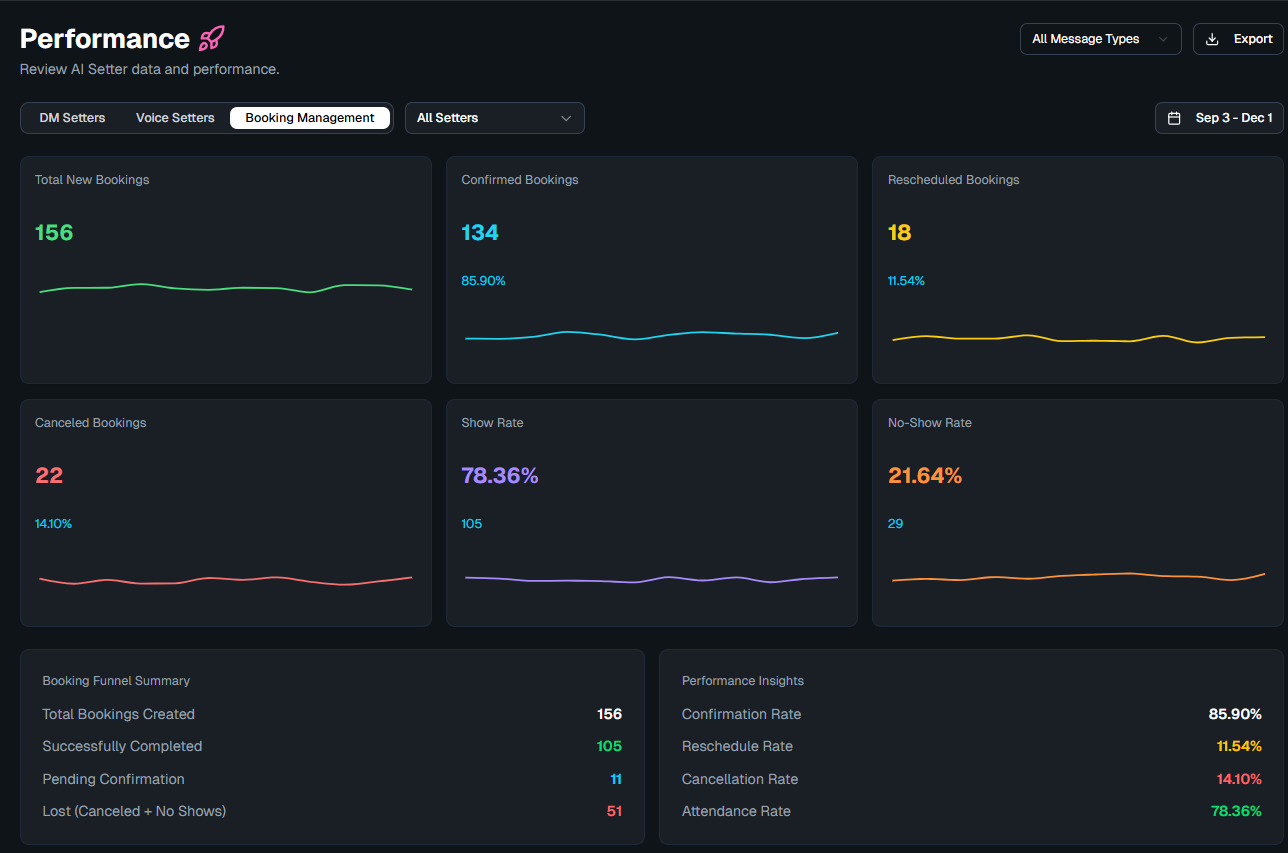
Where to Find Booking Metrics
Booking performance data is accessible from the Performance section within the Booking Managers tab. Metrics are broken down by individual Booking Manager and can be viewed across custom date ranges.
Key Metrics Tracked
1. Booking Volume
• Total Bookings: Number of appointments created through Charlie's autobooking
• Bookings Over Time: Trend line showing daily/weekly booking volume
2. Confirmation Rates
• Confirmation Rate %: Percentage of booked leads who confirmed their appointment (responded "YES")
• Unconfirmed: Number of leads who did not respond to confirmation reminders
• Auto-Canceled: Number of appointments automatically canceled due to no confirmation (if enabled)
3. Show Rates
• Show Rate %: Percentage of confirmed leads who actually attended their meeting
• No-Shows: Number of leads who confirmed but did not attend
• No-Show Recovery Rate: Percentage of no-shows that were successfully rebooked by the No-Show Re-Booking function
4. Reschedule & Cancellation Rates
• Rescheduled: Number of bookings that were rescheduled by the lead
• Canceled: Number of bookings canceled (by lead or auto-canceled)
5. Bookings History
A detailed log of all successful Charlie bookings, including:
• Account name
• AI Setter / Booking Manager agent
• Lead name and contact info
• Booking timestamp
• Direct link to the lead record
• Confirmation status (confirmed / unconfirmed / canceled)
How to Use Metrics to Improve Performance
Low confirmation rate? — Review and customize your confirmation reminder messages. Test shorter, more direct messaging.
High no-show rate? — Ensure the "Confirmed Booking Reminders" are enabled so leads get gentle nudges even after confirming.
Many cancellations? — Check if leads are canceling at specific reminder intervals — you may want to adjust timing or messaging.
Good no-show recovery? — If your No-Show Re-Booking rate is high, that's a sign the feature is working well. If low, review the requalification criteria.