Revenue Tracking: Webhook
Last updated: September 17, 2026
If you run your own tech stack ( a custom CRM, an internal platform) and don't use GoHighLevel, HubSpot, or Zapier, you can now report closed revenue straight to Charlie with a permanent webhook, no OAuth token to babysit, no third-party tool required.
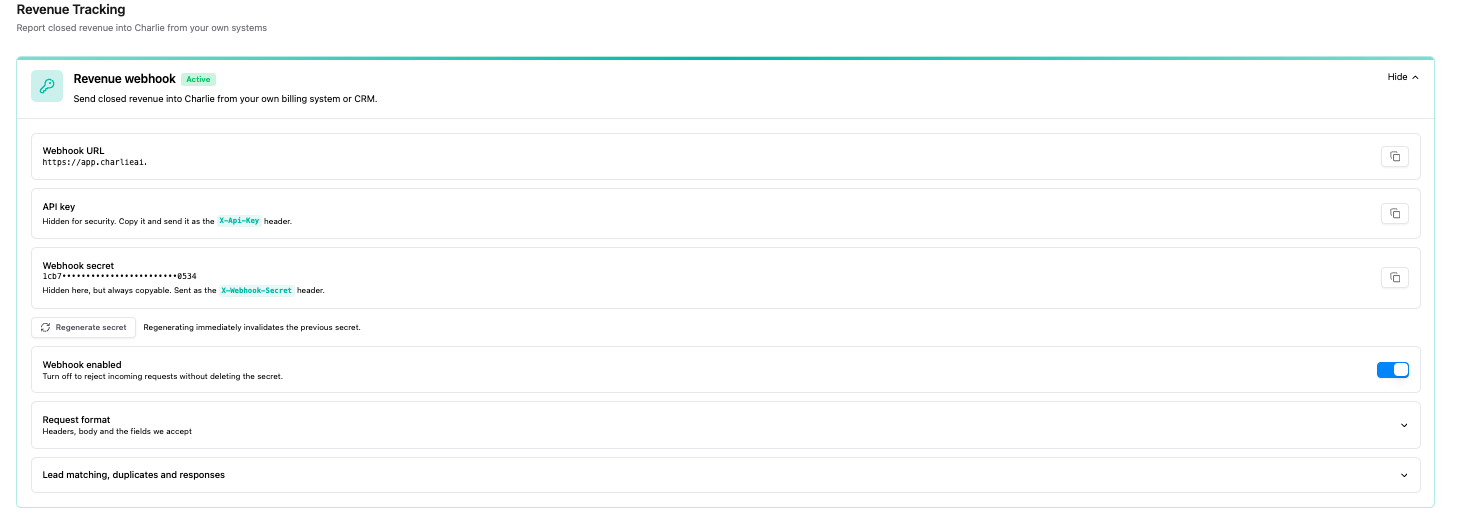
Where to find it
Dashboard → Integrations → Account-level tab → Revenue webhook.
What you'll find:
- Webhook URL (copy button) — POST this URL.
- API key — your account ID. Hidden by default; copy it to send as a header.
- Webhook secret — generate it here; shown once, then masked. Copy it to send as a header. Regenerating immediately invalidates the old secret — update your integration before regenerating in production.
- Webhook enabled toggle — turn off to reject all requests without deleting the secret.
- Built-in reference for the request format, fields, and response codes (so a client can integrate without contacting support).
How the lead is matched
Phone + email first, then phone only, then email only, most-recently-updated wins. Only leads that reached the CTA are eligible; playground leads are always excluded.
Duplicate protection
- Same externalId, same amounts → no new event; the existing one is returned unchanged.
- Same externalId, different amounts → the existing event is updated (a field you omit keeps its previously stored value; an explicit 0 overwrites it).
- No externalId: the same amounts for the same lead within 5 minutes are treated as a retry and not double-recorded. More than 5 minutes apart, or send an externalId if you need exact control.
Limitation
If you send one webhook call per lead, cashCollected adds up correctly, but contractValueClosed gets counted again on every call and inflates the total.
Send contractValueClosed once (on the first or a designated contact) if you're reporting a payment plan. This applies equally to the existing Zapier action and is tracked as a separate improvement.