Hubspot: Voice setter integration
Last updated: January 22, 2026
HubSpot integration enables seamless connectivity between your Charlie Voice Setters and your CRM, allowing for automated workflows, synchronized data, calendar integration, and comprehensive call tracking. This guide explains how to configure it, benefits, logs of call transcripts and key insights for optimal performance.
Prerequisites
Active Hubspot account
Admin access to both Charlie and HubSpot
Voice setter created
Voice Setters must be manually integrated with HubSpot, they do not automatically inherit integration from DM setters.
Benefits
This integration ensures that your voice conversations are fully integrated into your existing workflows, providing visibility and automation across your customer's engagement process. It enables:
Automated call workflows triggered by HubSpot sequences
Transcript logging automatically saved as HubSpot notes
Calendar synchronization for seamless booking management
Custom data mapping to align Charlie and HubSpot fields
Property update triggers for automated CRM updates based on call outcomes
Configuration
First-time integration process: When no setter has been integrated with Hubspot yet:
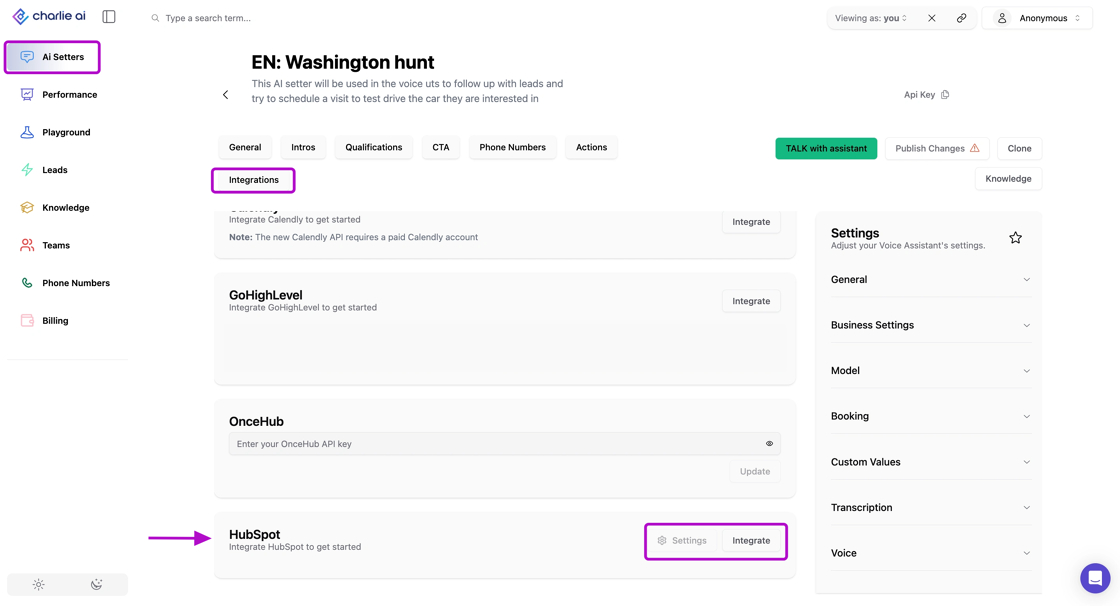
Step 1: Access Integration Settings
Open "Ai Setters" in your left side menu
Navigate to your Voice Setter in Charlie, select one to configure
Look for the Integrations tab in the top menu, and click on it
Locate HubSpot from the available integrations
Step 2: Authenticate with HubSpot
Click "Connect to HubSpot"
You'll be redirected to HubSpot's authentication page
Log in with your HubSpot credentials
Review the permissions Charlie is requesting
Click "Grant access" or "Connect app"
Step 3: Complete Connection
You'll be redirected back to Charlie
Confirm the connection was successful
Your Voice Setter is now integrated with HubSpot
The Voice Setter integrations page provides access to the same features available for DM setters:
Integration status (connected/disconnected)
Property updates
Custom Value Mapping
Trigger rule creation
Property update definitions
Trigger activity logs
Automatic call transcript logging
When a Voice Setter call ends, Charlie automatically:
Generates a complete transcript of the conversation
Creates a new note in HubSpot
Attaches the note to the associated contact record
Timestamps the note with call date and time
Includes a lead link
The HubSpot note includes:
Full conversation transcript
Call duration
Voice Setter used
Call outcome (if applicable)
Key data points extracted during the call
Transcripts are automatically associated with the correct contact record based on:
Phone number matching
Email address (if collected during call)
Key Insights
HubSpot integration transforms Voice Setters from standalone tools into fully integrated components of your sales ecosystem.
Taking time to properly configure field mapping prevents data quality issues.
Call transcripts automatically logged in HubSpot provide invaluable records for compliance, training, quality assurance, and customer insights without any manual effort.