BM Kill switch
Last updated: October 8, 2026
Previously, there was only one kill switch that stopped everything. Now, the Booking Manager has its own independent kill switch called the BM Kill Switch.
You can turn one on without affecting the other. This gives clients much more precise control over how each agent behaves for a lead.
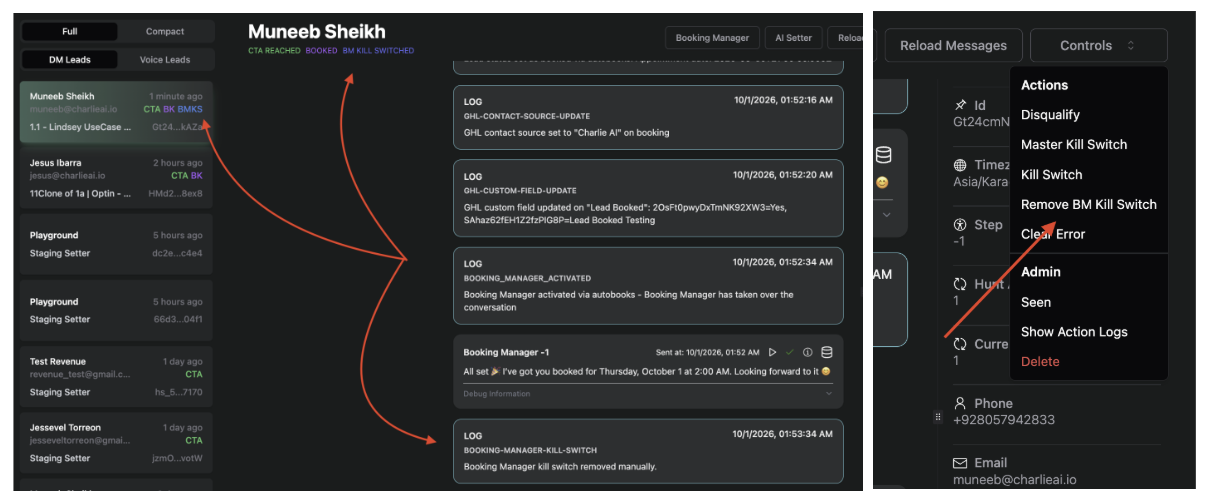
Here is how they work:
Normal Kill Switch — stops the DM Setter only.
BM Kill Switch — stops the Booking Manager only.
Booking Manager Kill Switch is ON
When the Booking Manager Kill Switch is turned on for a lead, all Booking Manager features are disabled for that lead. This includes:
General messages after booking
Autobooks Cancellation (through conversation)
Autobooks Rescheduling (through conversation)
Autobooks Rebooking (through conversation)
Leads Outside Charlie (Type 3 Leads)
External Booking
Buyer IQ for External Booking
External Cancellation
External Rescheduling
No Show Follow Up
No Show Rebooking
Auto Cancellation
Reminders and Messages
Confirmation Request Messages
Confirmation Response
Booking Reminders
Note: Autobooks Booking will still work and book the lead normally.
Trigger
Manually
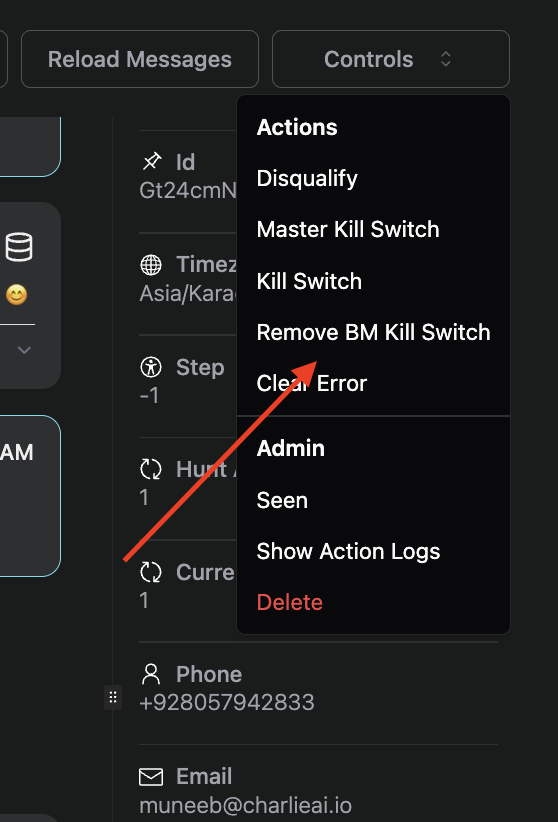
Turn it on from the lead's Controls menu. The option only shows when the lead's setter has an active Booking Manager.
Externally
The Booking Manager Kill Switch can also be triggered externally through the Webhook API.
API Key: UseCase.ApiKey
When the DM Setter Kill Switch is ON
Only DM Setter related functionality will stop working. Once the Booking Manager is activated through external booking, the Booking Manager takes over the lead.
The lead should not get autobooked before the Booking Manager is activated.
If the DM Setter Kill Switch is off, the DM Setter will work normally.