GHL: Shutting off Charlie
Last updated: December 9, 2025
Charlie has different methods to get disabled, below we explain you 5 ways to turn Charlie off.
Definition
To begin with, we want to make a quick definition and differentiation between two terms that are used to shut Charlie off:
Kill Switch: this will only apply for a specific setter. Charlie can still be activated to join the conversation through another setter. This action can be undone or re-applied.
Master Kill Switch: this applies as a global configuration for the lead: Lead will be out of Charlie's reach as it will be kill switched to all setters. Ensuring that it won't get activated again. It can't be undone and will permanently kill Charlie for that particular lead . Activate it through Charlie's Dashboard.
Activate Master Kill Switch
Go to Charlie's Dashboard
Go to the leads conversation
Look for the "Controls" option of the menu at the top right corner,
Manually apply the "Master Kill switch" (2 option) and can be removed as well in case they want to activate the lead again.
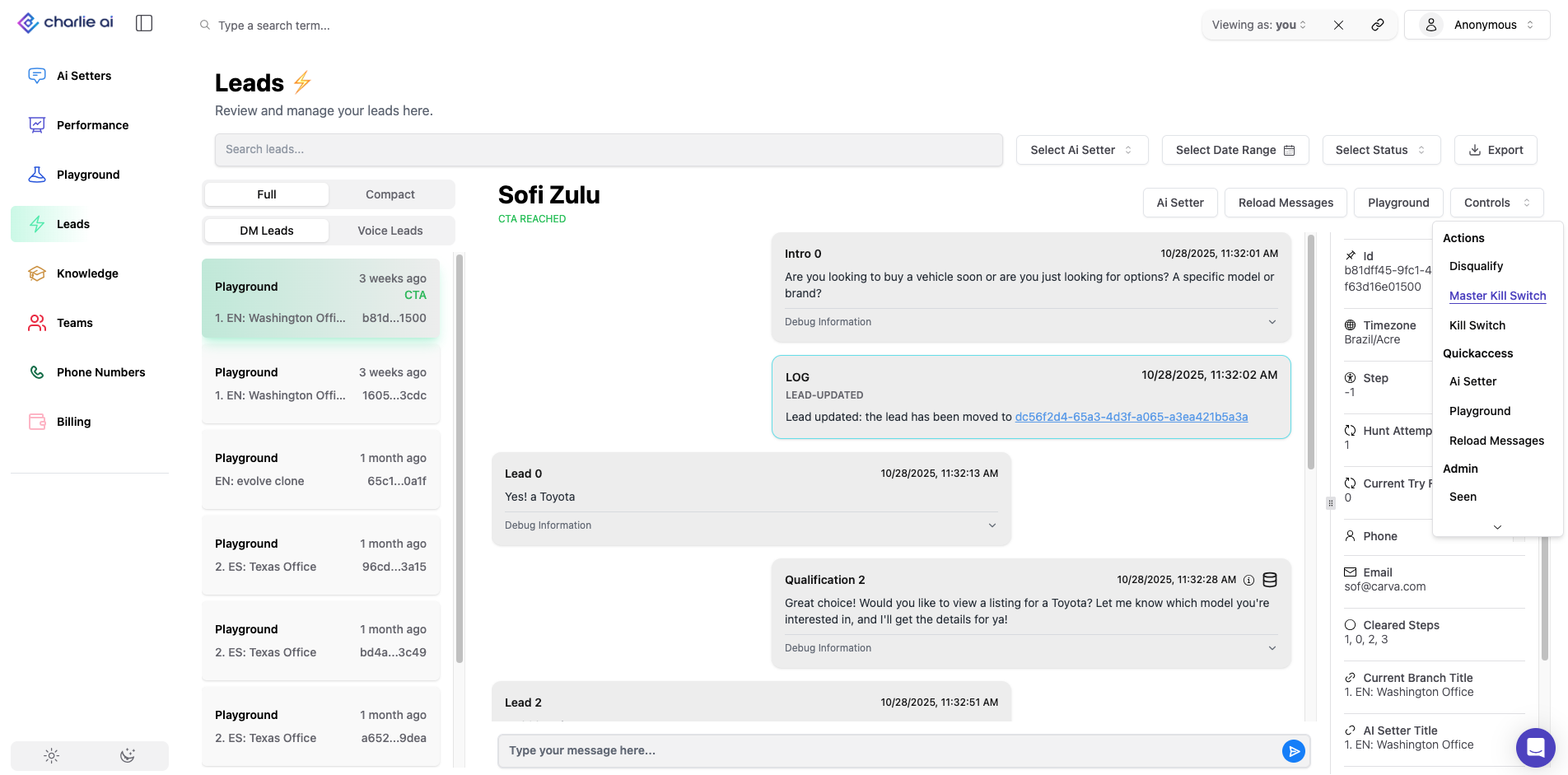
Shut Charlie off
Methods:
Method 1: via Calendar Booking in GHL
When you download or import the snapshot, there are workflow templates already included to automatically shut off leads when they are booked. Just follow the ff steps to ensure the calendar is set up in GHL. ( 📄 GHL: Load Snapshot )
Ensure Calendar is Set Up in GHL:
If you’re using a native calendar in GHL, the system will automatically shut off Charlie when a call is booked.
No extra action is required. Once a call is confirmed, Charlie will stop the outreach.
Using an External Calendar (e.g., ScheduleOnce or Calendly):
If your calendar is outside of GHL, you'll need to set up a Zap. More information on the 📄 Zapier: Integration
The Zap should trigger when a booking is made, and you can apply the “Charlie Kill Switch” tag to stop Charlie from engaging with that lead.
You can set this up by:
Triggering the workflow via the “Charlie Kill Switch” tag or by directly putting people into the workflow when they book outside of GHL.
Method 2: Manually Applying the Kill Switch Tag
Manual Tag Application in GHL:
If you want to manually stop Charlie, navigate to the contact in GHL.
In the contact's details, apply the "Charlie Kill Switch" tag.
This tag triggers a workflow that tells Charlie to shut off and stop engaging with the contact.
Kill switch from the Dashboard:
Go to the dashboard and select the contact (lead).
In the controls for that lead, apply the “Kill Switch.”
This will stop Charlie from further interaction with that lead.
Master kill switch in dashboard
Go to the "leads" tab and select the lead
Look for the "controls" option in the right top corner menu
Select "Master Kill Switch" for that specific Leads' conversation.
Kill switch must be configured setter by setter, this is not a global configuration.
Method 3: Immediate Call Bookings (VSL Page Scenario)
Situation: If a lead books a call immediately from a VSL page (without interacting with Charlie):
Go to your GHL automations and open the relevant workflow folder.
Navigate to the webhook section and click to add an item.
Set Up Webhook:
In the webhook setup, add the field
useCaseID.Ensure you follow the exact formatting:
Use
_useCaseID, capital C for "Case," and capital D for "ID."
Retrieve the correct ID:
Go to your AI Setters dashboard, find the ID for the use case, and copy it.
Paste this ID into the webhook’s value field.
Repeat for Multiple Use Cases:
If you have multiple use cases, repeat the process by adding more items and pasting the corresponding use case IDs.
Method 4: Fail-Safe for DND (Do Not Disturb) Protocol
DND Setup:
The system has a fail-safe DND workflow that automatically stops Charlie if a lead responds with keywords like "stop" or "unsubscribe."
These workflows ensure Charlie is shut off even if the GHL system doesn’t automatically pick up on these keywords.
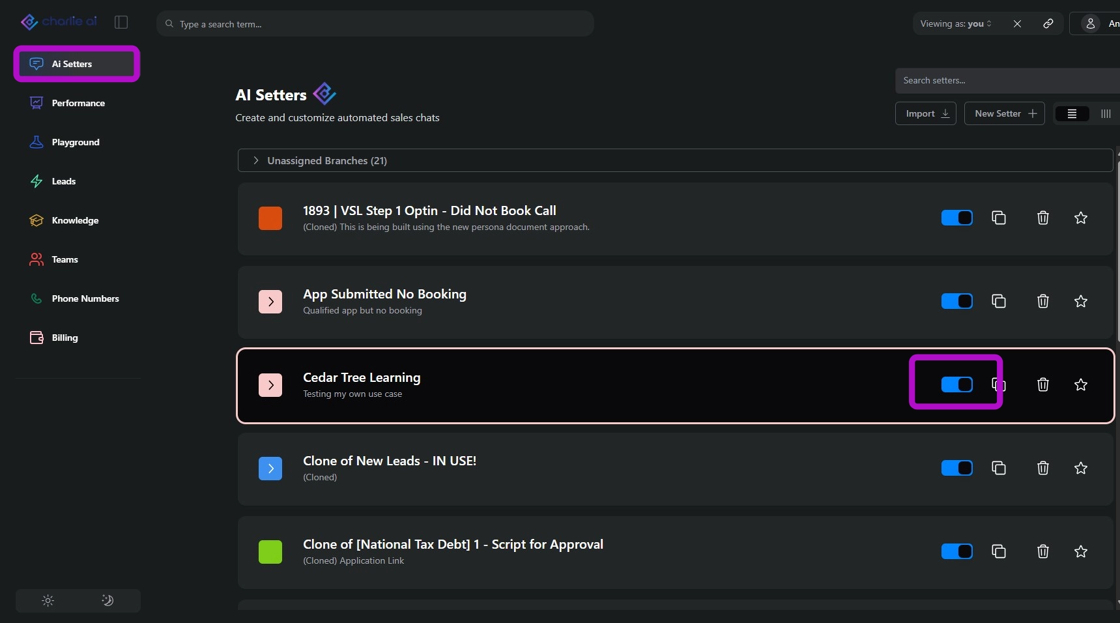
Method 5: Disable the Setter
From the menu of Setters, you may disable the Setter so no messages will be sent.
Visual guidance
Additional Notes:
Custom Automation: You can customize these workflows and triggers based on how your leads interact with Charlie.
Multiple Lead Systems: If using a third-party calendar, always ensure integration with GHL for seamless shutoff.
Manual Control: You always have the option to manually apply the kill switch through GHL or the dashboard if needed.